
Transferring balance from NTC to NTC is still one of the most useful features in Nepal. Yes, digital wallets are everywhere, but not everyone uses online payments. Many people—especially in rural areas and older age groups—still rely on basic balance transfer when they urgently need talktime.
If you are wondering how to transfer balance from ntc to ntc easily, this guide covers different working method with clear steps.
Rules & Requirements for NTC Balance Transfer
To transfer balance from NTC to NTC, you must follow these conditions:
Sender must have a Prepaid NTC SIM, and receiver must be NTC user (Not NTC to Ncell)
- Balance transfer is available only for Prepaid GSM users (postpaid cannot send)
You need your Security Code
Minimum transferable amount: Rs. 10
Maximum transferable amount per transaction: Rs. 500
Maximum limit: 20 transfers per day
Balance once sent cannot be reversed, so always check the number carefully
How to Transfer Balance from NTC to NTC (Working Methods)
Below are all working methods in 2025. These cover both traditional and app-based options.
Method 1: Transfer NTC Balance Using USSD Code
This is the most common and fastest way.
Step-by-step:
- Open your phone’s dial pad
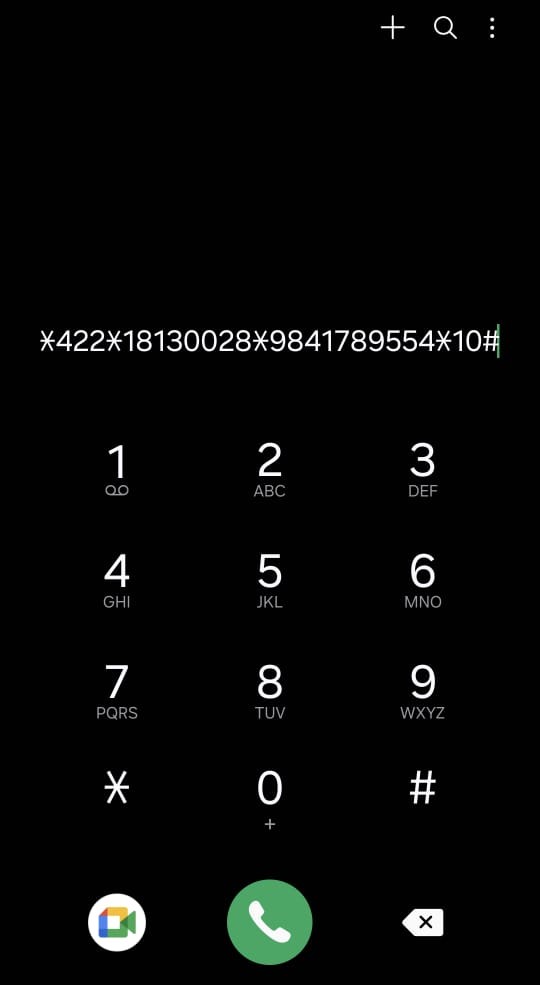
- Dial the following format: *422*SecurityCode*DestinationNumber*Amount#
- Press Call
- You will receive an SMS confirmation
Example: *422*18130028*9841789554*10#
After a few seconds, NTC will send you an SMS confirming the transfer.
How to Know Your NTC Security Code
You can easily check or recover your NTC security code using any one of these:
- SMS: Type SCODE and send it to 1415
- Call: Dial 198 and follow the voice instructions
- NTC App: The app shows your code and allows reset options
If you’ve forgotten your code, simply use the SCODE → 1415 SMS method to get a new one.
Method 2: Transfer Balance Using Nepal Telecom App

What is NTC Balance Transfer?
NTC balance transfer allows you to send your mobile balance from one Nepal Telecom (NTC) prepaid number to another NTC number.
It works within seconds and requires either a security code or the NTC app.
Don’t have an NTC SIM? Learn how to buy a SIM card in Nepal and get connected easily.
NTC Prepaid vs Postpaid
| Feature | Prepaid SIM | Postpaid SIM |
|---|---|---|
| Payment Method | You top-up first, then use the service | You use first, pay later |
| Balance Transfer | Can send and receive balance | Can only receive, cannot send |
| Common Users | Students and general users | Business and office users |
| Works For Balance Transfer | Prepaid → Prepaid/Postpaid | Cannot send to others |
Frequently Asked Questions (FAQs)
Use: *422*SecurityCode*DestinationNumber*Amount#
You can transfer minimum Rs. 10.
Maximum Rs. 500 per transaction and 20 transactions per day.
No, NTC does not charge any fee.
No, NTC → Ncell transfer is not allowed.
Yes, prepaid users can send balance to postpaid numbers.
No, postpaid cannot send, they can only receive.
Use the Nepal Telecom mobile app, which lets you transfer without entering the code manually.
Usually within 2–5 seconds.
Unfortunately, NTC does not refund once balance is transferred.
You will receive an SMS confirmation from NTC.